-
[Python] ruff 사용법언어/파이썬 & 장고 2025. 8. 29. 00:20
Ruff란
Ruff는 Rust로 작성된 고성능 Python 린터이자 코드 포매터입니다. 이 도구는 기존의 Python 코드 품질 도구들(Black, flake8, isort 등)을 하나로 통합하면서도 극도로 빠른 성능을 제공합니다.
왜 Ruff를 사용해야 하는가?
1. 압도적인 성능
- 기존 도구들보다 10-100배 빠른 속도
- 대규모 코드베이스에서도 수초 내에 완료
- Rust의 성능 최적화와 병렬 처리 활용
2. 통합된 기능
- 린팅: 코드 오류 및 스타일 문제 검출
- 포매팅: 자동 코드 정렬
- 임포트 정렬: 모듈 import 구문 자동 정리
- 하나의 도구로 여러 기능 제공
3. 광범위한 규칙 지원
- 800개 이상의 내장 lint 규칙
- Flake8 플러그인들과 호환
- 사용자 정의 규칙 추가 가능
4. 간편한 설정
- 최소한의 구성으로 바로 사용 가능
- pyproject.toml을 통한 중앙집중식 설정
- 기존 도구들의 설정을 쉽게 마이그레이션
기존 도구들과의 비교
도구 주요 기능 장점 단점 ruff 린팅 + 포매팅 + 임포트 정렬 매우 빠름 통합된 기능 활발한 개발 상대적으로 새로운 도구 일부 고급 기능 부족 black 코드 포매팅 안정적 널리 채택됨 일관된 스타일 포매팅만 담당 커스터마이징 제한적 flake8 린팅 다양한 플러그인 세밀한 제어 상대적으로 느림 복잡한 설정 isort 임포트 정렬 세밀한 임포트 제어 다양한 정렬 옵션 임포트만 담당 다른 도구와 충돌 가능 성능 비교 (대략적인 수치)
- Ruff: 1초
- Black + flake8 + isort: 30-60초 (동일한 코드베이스 기준)
Ruff 설치 및 기본 사용법
1. 설치
# pip를 통한 설치
pip install ruff

# uv를 통한 설치
uv add ruff
2. 기본 사용법
# 프로젝트 전체 린팅
ruff check .

# 특정 파일 린팅
ruff check my_script.py

# 자동 수정 가능한 문제들 수정
ruff check --fix .

# 코드 포매팅
ruff format .

# 린팅과 포매팅 함께 실행
ruff check --fix . && ruff format .
3. 주요 명령어 옵션
# 특정 규칙만 체크
ruff check --select E9,F63,F7,F82 .

# 특정 규칙 무시
ruff check --ignore E501 .

# 상세한 출력
ruff check --verbose .

# 통계 표시
ruff check --statistics .

# JSON 형태로 결과 출력
ruff check --output-format json .
설정 방법
1. pyproject.toml을 통한 설정
[tool.ruff]
# 대상 Python 버전 - 설정하지 않으면 모든 파이썬 버전 대상으로 진행
target-version = "py38"

# 한 줄 최대 길이
line-length = 88

# 제외할 파일/디렉토리
exclude = [
    ".bzr",
    ".direnv",
    ".eggs",
    ".git",
    ".hg",
    ".mypy_cache",
    ".nox",
    ".pants.d",
    ".ruff_cache",
    ".svn",
    ".tox",
    ".venv",
    "__pypackages__",
    "_build",
    "buck-out",
    "build",
    "dist",
    "node_modules",
    "venv",
]

[tool.ruff.lint]
# 활성화할 규칙들
select = [
    "E",  # pycodestyle errors
    "W",  # pycodestyle warnings
    "F",  # Pyflakes
    "I",  # isort
    "B",  # flake8-bugbear
    "C4", # flake8-comprehensions
    "UP", # pyupgrade
]

# 무시할 규칙들
ignore = [
    "E501",  # line too long
    "B008",  # do not perform function calls in argument defaults
]

# 파일별로 규칙 무시
[tool.ruff.lint.per-file-ignores]
"__init__.py" = ["F401"]  # imported but unused
"tests/**/*.py" = ["S101"]  # use of assert

[tool.ruff.format]
# 문자열 따옴표 스타일
quote-style = "double"

# 들여쓰기 스타일
indent-style = "space"

# 후행 쉼표 처리
skip-magic-trailing-comma = false

# 문자열 정규화
string-normalization = true
2. ruff.toml 파일 사용
line-length = 88
target-version = "py38"

[lint]
select = ["E", "W", "F", "I"]
ignore = ["E501"]

[format]
quote-style = "double"
주요 규칙 카테고리
코드 스타일 규칙
- E: pycodestyle 오류
- W: pycodestyle 경고
- F: Pyflakes 규칙
코드 품질 규칙
- B: flake8-bugbear (일반적인 버그 패턴)
- C4: flake8-comprehensions (리스트/딕셔너리 컴프리헨션)
- S: flake8-bandit (보안 문제)
코드 현대화
- UP: pyupgrade (Python 버전별 모던 문법)
- I: isort (import 정렬)
파이참에 ruff 적용
Settings/Preferences→Tools→File Watchers로 이동하여+버튼을 클릭하고Custom을 선택아래와 같이 lint와 formatting 추가
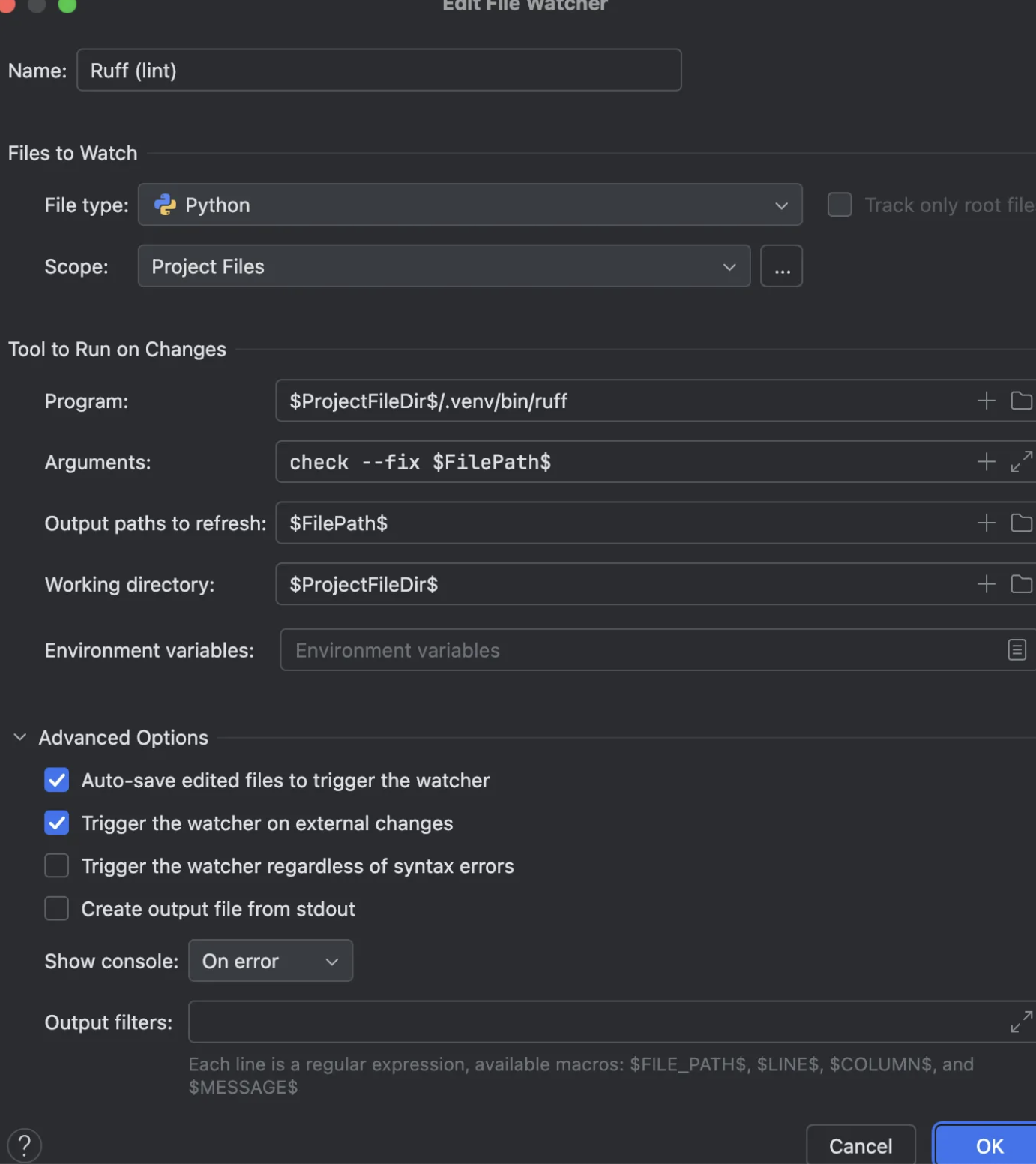
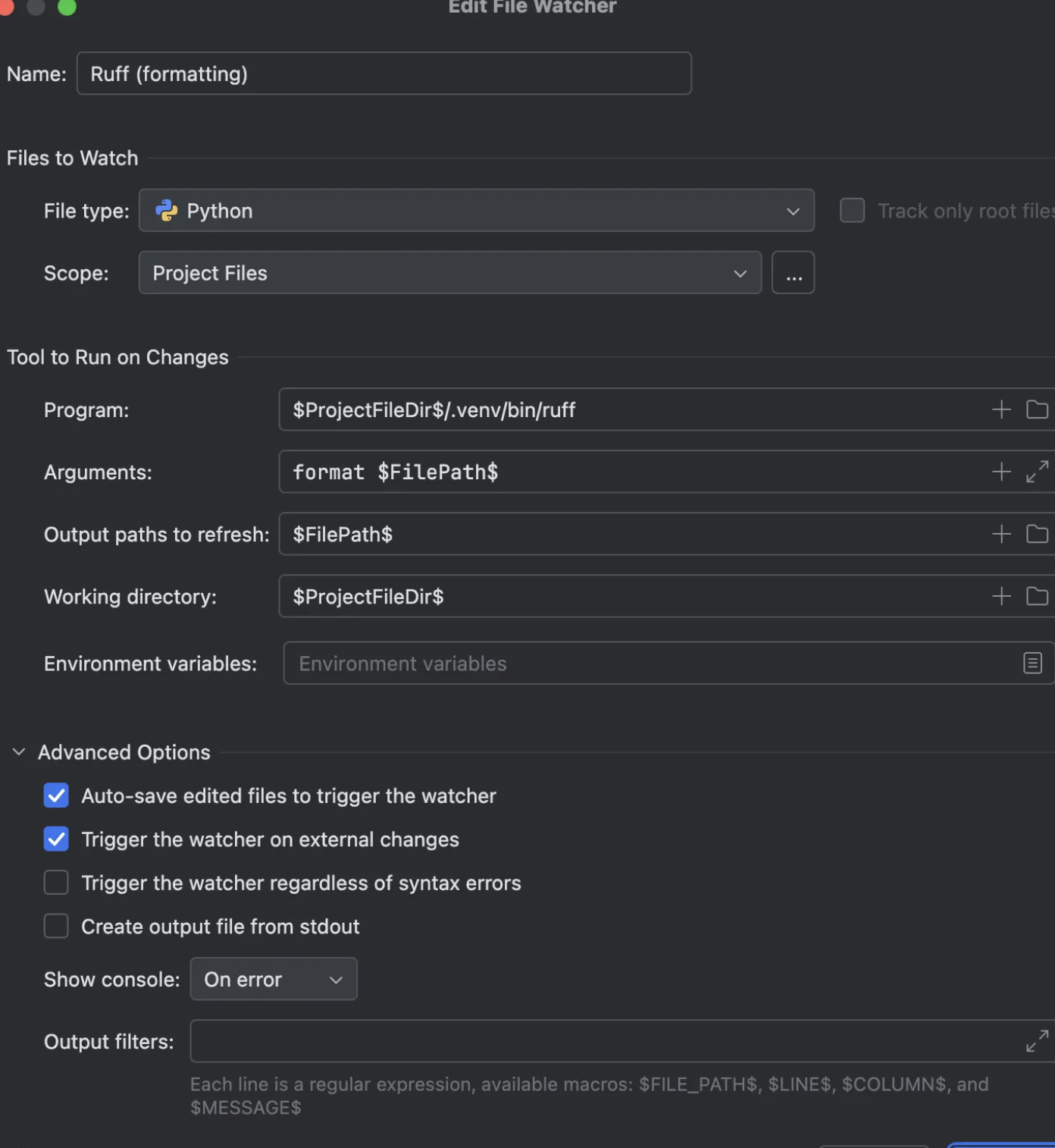
program에는 ruff가 설치되어 있는 경로로 변경하면 됩니다.
실제 사용 예제
아래는 uv 기반으로 pre-commit과 연결하여 사용하는 예시입니다. pre-commit이 실행될 때, pyproject.toml에 명시한 ruff 옵션이 적용됩니다.
pyproject.toml
[project]
name = "test"
version = "0.1.0"
description = "Add your description here"
readme = "README.md"
requires-python = ">=3.12"
dependencies = [
]

[dependency-groups]
dev = [
    "pre-commit>=4.3.0",
    "ruff>=0.12.11",
]

[tool.ruff]
exclude = [
    ".bzr",
    ".direnv",
    ".eggs",
    ".git",
    ".git-rewrite",
    ".hg",
    ".ipynb_checkpoints",
    ".mypy_cache",
    ".nox",
    ".pants.d",
    ".pyenv",
    ".pytest_cache",
    ".pytype",
    ".ruff_cache",
    ".svn",
    ".tox",
    ".venv",
    ".vscode",
    "__pypackages__",
    "_build",
    "buck-out",
    "build",
    "dist",
    "node_modules",
    "site-packages",
    "venv",
]

# Same as Black.
line-length = 88
indent-width = 4

[tool.ruff.lint]
select = [
    # 기존 규칙 (기본적으로 포함)
    "E",  # pycodestyle errors
    "F",  # pyflakes errors
    "B",  # bugbear warnings
    "I",  # isort (import sorting)
    "C",  # flake8-comprehensions
    "D",  # pydocstyle
    "N",  # flake8-naming
    "UP", # pyupgrade
    "TID",# flake8-tidy-imports
    "ISC",# flake8-implicit-str-concat
]
# E501은 라인 길이 초과 규칙 (format이 처리함) / # D10X pydocstyle에서 특정 규칙 무시
ignore = ["D100", "D101", "D102", "D103", "D104", "D205", "D107", "D200", "D203", "D213", "D400", "D415", "E501"]
# Allow fix for all enabled rules (when `--fix`) is provided.
fixable = ["ALL"]
unfixable = []

[tool.ruff.format]
# Like Black, use double quotes for strings.
quote-style = "double"
# Like Black, indent with spaces, rather than tabs.
indent-style = "space"
# Like Black, respect magic trailing commas.
skip-magic-trailing-comma = true
# Like Black, automatically detect the appropriate line ending.
line-ending = "auto"
docstring-code-format = true
docstring-code-line-length = "dynamic"

[tool.ruff.lint.isort]
split-on-trailing-comma=false

[tool.ruff.lint.per-file-ignores]
# 테스트 파일에서는 assert 사용 허용
"tests/**" = ["S101"]
# __init__.py에서는 unused import 허용
"*/__init__.py" = ["F401"]
.pre-commit-config.yaml
# See https://pre-commit.com for more information
# See https://pre-commit.com/hooks.html for more hooks
repos:
-   repo: https://github.com/pre-commit/pre-commit-hooks
    rev: v3.2.0
    hooks:
    -   id: trailing-whitespace
    -   id: end-of-file-fixer
    -   id: check-yaml
    -   id: check-added-large-files

-   repo: https://github.com/charliermarsh/ruff-pre-commit
    rev: v0.12.10
    hooks:
    -   id: ruff-check
        args: [--fix]
    -   id: ruff-format
git commit -m 'precommit 추가' Trim Trailing Whitespace.................................................Passed Fix End of Files.........................................................Passed Check Yaml...........................................(no files to check)Skipped Check for added large files..............................................Passed ruff check...............................................................Passed ruff format..............................................................Passed [master 309cc1d] precommit 추가결론
Ruff는 Python 개발에서 코드 품질을 크게 향상시킬 수 있는 강력한 도구입니다. 뛰어난 성능과 통합된 기능으로 개발 워크플로우를 단순화하면서도 높은 코드 품질을 유지할 수 있습니다.